Hermes memory is not a single “remember this” field. It is a layered system for making future agent runs require less repeated context and fewer corrections. Run /context before blaming memory: live conversation pressure and durable recall are different layers, and /context all exposes skill and tool-schema costs.
Quick answer#
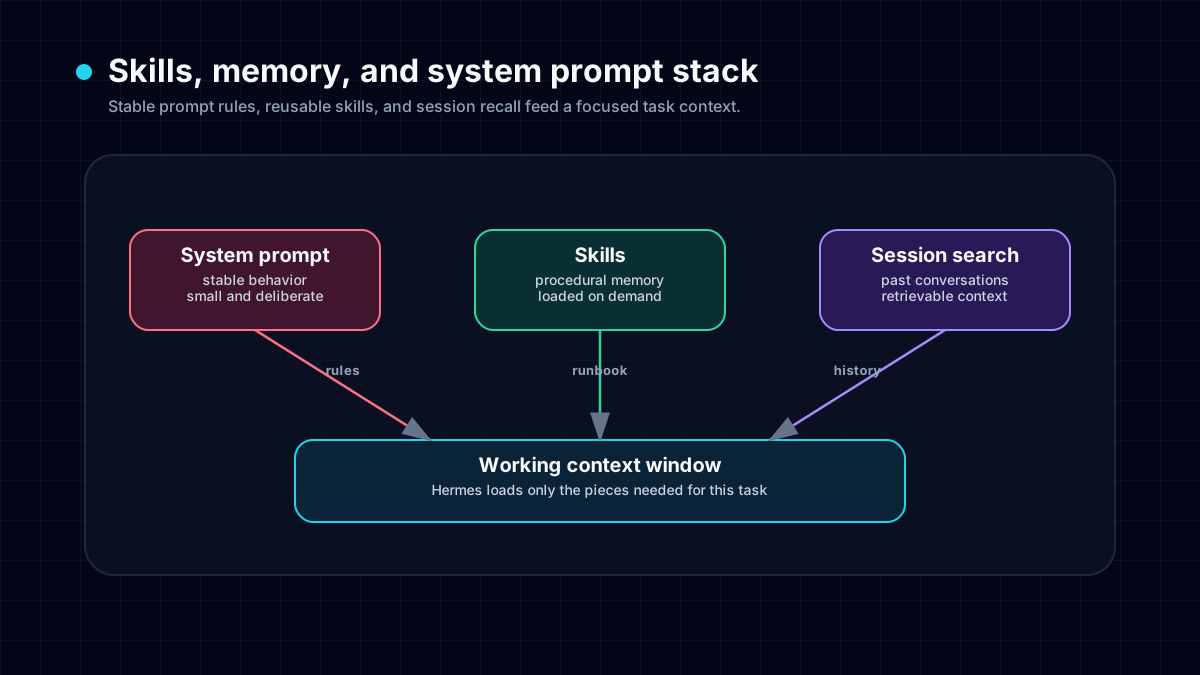
Hermes Agent memory has three practical layers: durable memory for stable facts and preferences, skills for reusable procedures, and session search for recalling past conversations. Use durable memory for facts that should shape future behavior, use skills for workflows with commands and verification steps, and use session search when a user references something from a previous conversation. This architecture is why Hermes wins on memory compared with stateless chat agents.
Layer 1: durable facts#
Durable memory is for compact facts that stay useful. Examples include preferred communication style, stable project paths, deployment conventions, environment quirks, and user corrections that should not need to be repeated.
Good memory is declarative:
- The project deploys through GitHub pushes.
- The user prefers concise plain-English status updates.
- The local config file is in a specific path.
Bad memory is a task log:
- Fixed bug X today.
- Opened PR Y.
- Need to finish step three tomorrow.
Those details expire quickly and belong elsewhere.
Layer 2: procedural skills#
Skills are the procedure layer. They tell Hermes when to load a workflow, which commands to run, which pitfalls to avoid, and how to verify success. A skill can be more detailed than memory because it is loaded only when relevant.
For example, a Hermes skill for browser QA might include viewport checks, console inspection, screenshot rules, and known renderer issues. That should not be crammed into a single memory entry.
Layer 3: session search#
Session search is for recall. When a user says “we fixed this before” or “use the approach from last time,” Hermes can search prior sessions instead of asking the user to repeat the whole story.
This keeps permanent memory small while still making old work discoverable. It also reduces the temptation to store raw transcripts as permanent facts.
How SOUL.md fits#
SOUL.md is personality and operating guidance. It is not a replacement for memory. Think of it as the stable character and behavior layer: tone, boundaries, identity, and high-level style. Memory adds facts. Skills add procedures.
For deeper customization, read the system prompt guide.
Profiles prevent context collisions#
If the same Hermes install handles personal tasks, work tasks, and public bots, profiles matter. A work deployment preference should not affect a personal assistant. A Telegram bot's public response style should not affect private research.
Use Hermes profiles to separate these contexts cleanly.
Privacy model#
Memory is powerful because it is persistent. Treat it like configuration, not casual chat. Never store raw secrets, tokens, or personal data that the agent does not need. For sensitive projects, combine memory with privacy controls, security hardening, and local model routes where appropriate.
Practical memory hygiene checklist#
Review memory periodically:
- Remove stale paths and obsolete conventions.
- Replace imperative notes with declarative facts.
- Move procedures into skills.
- Keep client or tenant facts separated.
- Avoid storing anything that expires within a week.
This keeps the agent sharper over time.
Example workflow#
A user corrects Hermes: “Do not use direct Vercel deploys for this project; push to GitHub.” Hermes should save the durable project convention as memory. If the deploy process has multiple commands and checks, Hermes should create or update a deploy skill. Later, when asked to ship a page, Hermes can act correctly without another reminder.
Next step#
Read why Hermes wins on memory, then set up your first profile and one reusable skill. If privacy is your main concern, pair this with the Hermes privacy guide and Ollama setup.
Install path#
To evaluate the memory system, install Hermes Agent and create a controlled test. Tell Hermes one stable project convention, ask it to complete a related task, then return later and ask for a similar task. Pair that with persistent memory and a skill when the procedure repeats.
The important test is behavioral. Hermes should not merely recite that it remembers something; it should choose the right default action because of that memory. For example, it should use the preferred deploy path, avoid a tool the user rejected, or load the project-specific checklist before editing files.
Recent community troubleshooting note#
Recent Discord threads around how to fix Hermes memory, Local hindsight memory installation broke Hermes, and auxiliary timeout failures show that memory architecture is only half the story. If recall or compaction fails in practice, use the Hermes memory troubleshooting checklist before changing providers or deleting state. Pair it with profiles when testing Hindsight, Recall, Obsidian, or another local memory layer.
Memory is bounded, reviewable, and auditable#
Built-in memory is not an unbounded transcript bucket. MEMORY.md is capped at 2,200 characters and USER.md at 1,375; over-capacity writes fail visibly so the agent can consolidate instead of silently evicting a fact. Use hermes journey list, edit, and delete to inspect learned nodes. Enable /memory approval on when automatic or foreground saves need review, and use the memory troubleshooting runbook when wrong facts, full stores, or background-review spend appear.
Choose a memory provider only after built-in memory passes#
Start with the built-in versus external provider decision tree. Built-in files handle concise durable facts; SQLite preserves session history; project files hold repository rules. Add an external provider only for a named retrieval, graph, fact, or sharing requirement, then measure token overhead and fresh-session recall.