Hermes Agent skills are reusable operating procedures: focused instructions, references, templates, and optional helper scripts that teach the agent how to perform a recurring job. A good skill reduces repeated explanation. A bad skill adds stale instructions, overlapping rules, security risk, and context cost to every matching task.
Quick answer#
Do not install a Hermes skill because its name sounds useful. First inspect it with hermes skills inspect, identify the exact job it should improve, review its source and permissions, check whether Hermes already has the capability as a native tool or MCP integration, and run one bounded test with an expected artifact. Keep the skill only if the result is measurably better. Use hermes skills audit, check, update, and uninstall to keep the library small and current.
Start with the Skills Hub guide when you need the catalog commands, use the custom skill tutorial when the workflow is unique, and read the MCP security guide before granting an extension access to powerful tools or credentials.
Test skill readiness under the scheduled runtime#
A skill that works in an interactive terminal can fail before a scheduled model call. The service user may not have its required executable on PATH, its credential file, or the environment variable declared by the skill. Current Hermes preflight checks attached skill readiness and can mark a job blocked_config without starting inference.
Test the skill under the actual owning profile and service environment with one bounded, read-only task. Record the command or file requirement that failed; do not disable validation merely to get the job to start. Keep credentials outside the skill text and prompt. The cron preflight checklist explains how to distinguish missing skill dependencies from provider and delivery errors.
Source: official Hermes scheduled-task documentation.
What a Hermes skill should contain#
A Hermes skill is not a vague personality prompt or a dump of everything you know about a project. Its core is a SKILL.md file with frontmatter that tells Hermes when the skill applies and a body that explains how to complete and verify the job. Supporting files can live beside it under references/, templates/, scripts/, or assets/.
Strong skills usually contain:
- one class of task and a specific trigger description;
- prerequisites and safe defaults;
- a step-by-step procedure;
- commands or tool calls that are current and scoped;
- failure modes and recovery steps;
- an acceptance test or required artifact;
- references and provenance for claims that may change.
If the document cannot say when it should not load, it is probably too broad.
The seven-point skill install gate#
1. Name the exact job#
Write one sentence: “This skill should help Hermes do ___ when ___.” If the answer is “be better at everything,” stop. A narrow deployment runbook, source-review workflow, or report template is testable. A general “expert agent” skill is not.
2. Inspect before installing#
Use the current CLI to preview the source:
hermes skills search kubernetes
hermes skills inspect openai/skills/k8s
Read the trigger description, procedure, referenced files, shell commands, URLs, environment variables, and requested tools. The Hermes skill library is useful for discovery, but discovery is not approval.
3. Check provenance and update ownership#
Ask who maintains the skill, where the source lives, when it changed, and how updates are reviewed. Official, well-known, GitHub, and community-directory sources have different trust boundaries. A recognizable source still does not make every command appropriate for your environment.
Record the source and version when the procedure affects production, security, billing, or publishing. That makes a later audit or rollback possible.
4. Review permissions, secrets, and injection surface#
Look for instructions that read credential files, export environment variables, upload files, run destructive shell commands, weaken approval gates, or fetch untrusted instructions. Hermes runs a security scan during external skill installation, but a scanner is a guardrail, not a guarantee.
Use the Hermes security hardening guide for filesystem, browser, MCP, and secret boundaries. Install into a separate Hermes profile when the skill needs a different trust level or set of credentials.
5. Check overlap and context cost#
Before adding a skill, ask whether the job is already covered by:
- a native Hermes tool;
- an enabled toolset;
- an MCP server;
- a project
AGENTS.md; - durable memory;
- another installed skill.
Duplicate procedures create conflicting instructions and consume context. Use /context to inspect session composition when a large skill set makes prompts slower or more expensive, then use the token overhead guide to separate useful context from bloat.
6. Run a bounded test#
Install only after inspection:
hermes skills install openai/skills/k8s
hermes skills list --source hub
Then run one prompt with a fixed input and an inspectable result. Define success before the run: a passing test, a correctly formatted file, a valid deployment plan with no execution, or a report that cites the required sources. Compare the result with and without the skill when the benefit is unclear.
Do not accept “done” as evidence. Inspect the artifact, diff, command output, or delivered message.
7. Keep, update, or remove it deliberately#
A skill earns permanent context only when it improves repeat work. Maintain the library with:
hermes skills audit
hermes skills check
hermes skills update
hermes skills uninstall k8s
Re-run the original acceptance test after an update. Uninstall skills that overlap, no longer trigger, contain stale commands, or do not improve completion quality.
Skill vs memory vs MCP vs native tool#
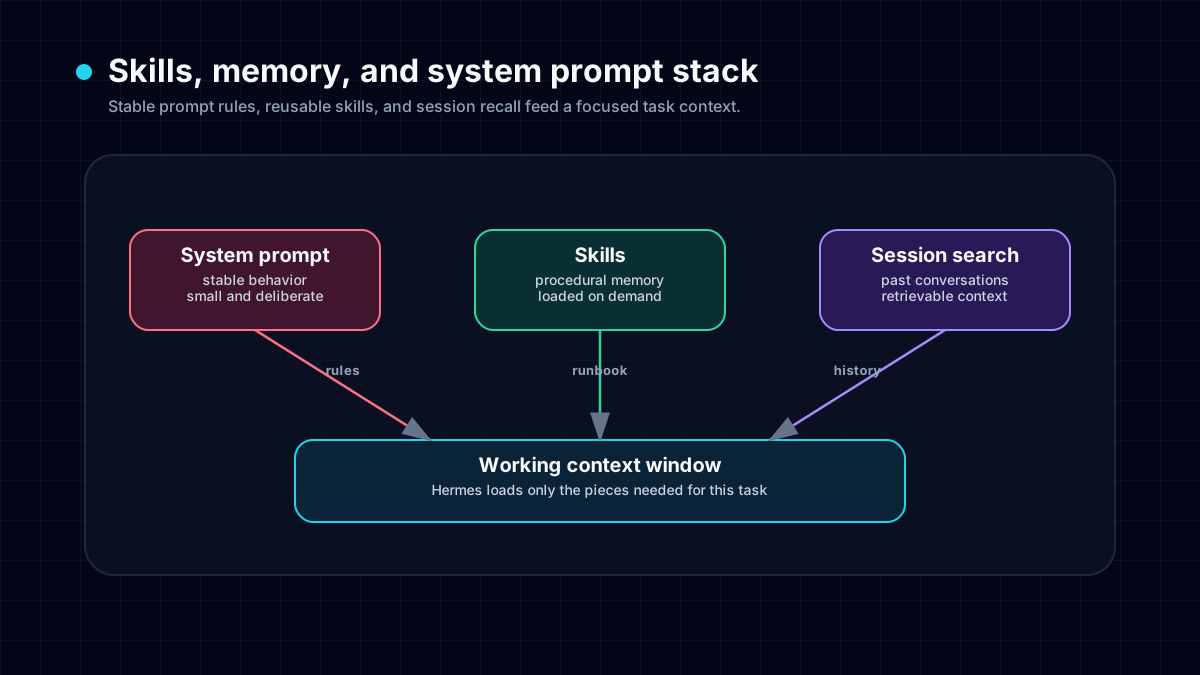
Choose the smallest mechanism that owns the job:
- Memory: stable facts and preferences that should be recalled later. Example: a project name, preferred timezone, or writing preference. Read how Hermes memory works.
- Skill: a reusable procedure with triggers, steps, references, and verification. Example: how to publish and visually QA one site.
- MCP server: an external tool interface that exposes actions or data. Example: a service API that the agent must call. Use the MCP integration guide.
- Native tool/toolset: a built-in capability such as files, terminal, browser, or web search. Do not wrap a native capability in another layer unless the skill adds a real procedure.
- Project instructions: repository-specific rules that should apply whenever Hermes works in that project, not globally.
The common mistake is saving procedures as memory. Memory may recall a fact, but it does not replace a tested runbook. The reverse mistake is turning every preference into a skill, which adds unnecessary procedure text.
How to evaluate whether a skill is actually good#
Score the result, not the description page. A useful evaluation includes:
- Trigger precision: it loads for the right requests and stays out of unrelated ones.
- Instruction quality: steps are specific, current, and ordered.
- Safety: permissions and side effects match the task.
- Verification: the skill requires real evidence before claiming completion.
- Efficiency: it reduces turns, retries, and context rather than adding ceremony.
- Portability: environment assumptions are explicit.
- Maintenance: source, version, and removal path are clear.
Test with an ordinary case, a failure case, and an unrelated prompt. A skill that succeeds once but hijacks unrelated work is not high quality.
A practical test template#
Copy this before evaluating a third-party skill:
Skill under test: <name and source>
Job: <one concrete task>
Input fixture: <fixed file, URL, or prompt>
Allowed tools: <explicit list>
Forbidden actions: <writes, sends, deploys, secrets>
Expected artifact: <file, report, test output>
Acceptance checks:
1. <check>
2. <check>
3. <check>
Stop condition: do not continue if <condition>
Run it in a disposable project or restricted profile first when the skill can write files, execute shell commands, browse authenticated sites, or call paid APIs.
Current community signal: users want fewer, better skills#
Fresh August 2026 creator evidence is unusually direct: one current Hermes video reports testing hundreds of skills and finding that most were not worth keeping. The useful audience questions were not “how many skills can I install?” They were provenance, prompt-injection risk, overlap, context bloat, user fit, and removal.
That matches the operational rule above: a large catalog is useful for discovery, but your installed set should stay small, trusted, and tested. Treat creator claims as demand evidence rather than a security verdict; verify commands and behavior against the current official Hermes documentation.
When to create your own skill#
Create a custom skill when the procedure is unique to your team, repeats often, and has a stable success check. First prove the workflow manually. Then use the create a Hermes skill tutorial to package it without mixing temporary task state into permanent instructions.
Good candidates include release QA, customer-report generation, incident triage, source-backed research, and a deployment checklist. Poor candidates include one-time errands, rapidly changing scratch notes, secrets, and a project’s entire knowledge base.
Checklist before you keep a skill#
- The trigger is narrow and understandable.
- The source and maintainer are recorded.
- Commands and links were checked against the current version.
- Secrets and destructive actions are not hidden in the procedure.
- Native tools, MCP, memory, and existing skills do not already own the job.
- A bounded test produced the expected artifact.
- An unrelated prompt did not trigger the skill.
- The update and uninstall path are known.
/contextshows an acceptable context footprint.- The skill still passes after every material update.
The goal is not the biggest skill collection. It is a small set of procedures that makes Hermes safer, faster, and more reliable on work you actually repeat.
For an applied example of a skill in a bounded workflow, see apartment-alert filtering with the Himalaya skill. The tutorial separates mailbox access from the rental rubric, explains the external CLI prerequisite, and keeps outreach under human control.