
Model Context Protocol is useful when you want Hermes Agent to talk to tools that were built for the broader AI ecosystem: databases, SaaS apps, local services, developer utilities, and internal systems. The mistake is treating MCP as magic. It is a tool boundary, and tool boundaries need configuration, permissions, testing, and security review. Hermes Agent v0.20 adds A2A v1.0 for agent-to-agent discovery and communication; use A2A for agent peers, not as a replacement for MCP tool servers. See the v0.20 Herald Release guide for the boundary.
July 2026 setup note: Hermes reads manual MCP definitions from the top-level mcp_servers: key, not mcp: servers:. Hosted connectors can use OAuth without an API key: add one with hermes mcp add NAME --url URL --auth oauth, then use hermes mcp login NAME when re-authentication is needed. In Docker, test every command path and localhost URL from inside the Hermes container. The safe MCP setup checklist now includes exact Docker, OAuth, reload, and stale-tool fixes.
2026 safety note: install MCP servers like production integrations. Prefer the Hermes MCP catalog when available, read the manifest/source, expose only needed tools with include/exclude filters, and test from the CLI before adding Telegram, Discord, or cron access. For the full threat model, see Is MCP safe for AI agents?.
September 2026 update: three setup traps keep appearing in community threads. First, MCP servers are scoped per Hermes profile — a server added to your default profile is not visible in a work or bot profile, so a missing server is usually profile isolation, not a broken install. Second, many database reference servers register read-only query tools by default; write access needs a separate server or an explicit unrestricted access mode. Third, a server can announce tool changes at runtime with tools/list_changed, and Hermes refreshes the tool list automatically, so re-check exposed tools after server updates instead of trusting the first install. The MCP security guide now includes a when-not-to-use-MCP decision section and per-profile scoping rules.
Quick answer#
Use MCP with Hermes Agent when a tool already exposes a good MCP server or when you need a reusable bridge that multiple agents can share. Use native Hermes tools when Hermes already has a first-class integration, and use a direct API when the workflow needs tight control, custom auth, or predictable schemas.
For a safe setup, start with the Hermes Agent install guide, add one MCP server at a time, test it with the Hermes MCP setup checklist, and keep risky servers isolated with self-hosted Hermes profiles or separate environments. A trustworthy MCP server should state host assumptions, requested permissions, env vars, network access, example tool calls, and rollback before it touches a real workflow.
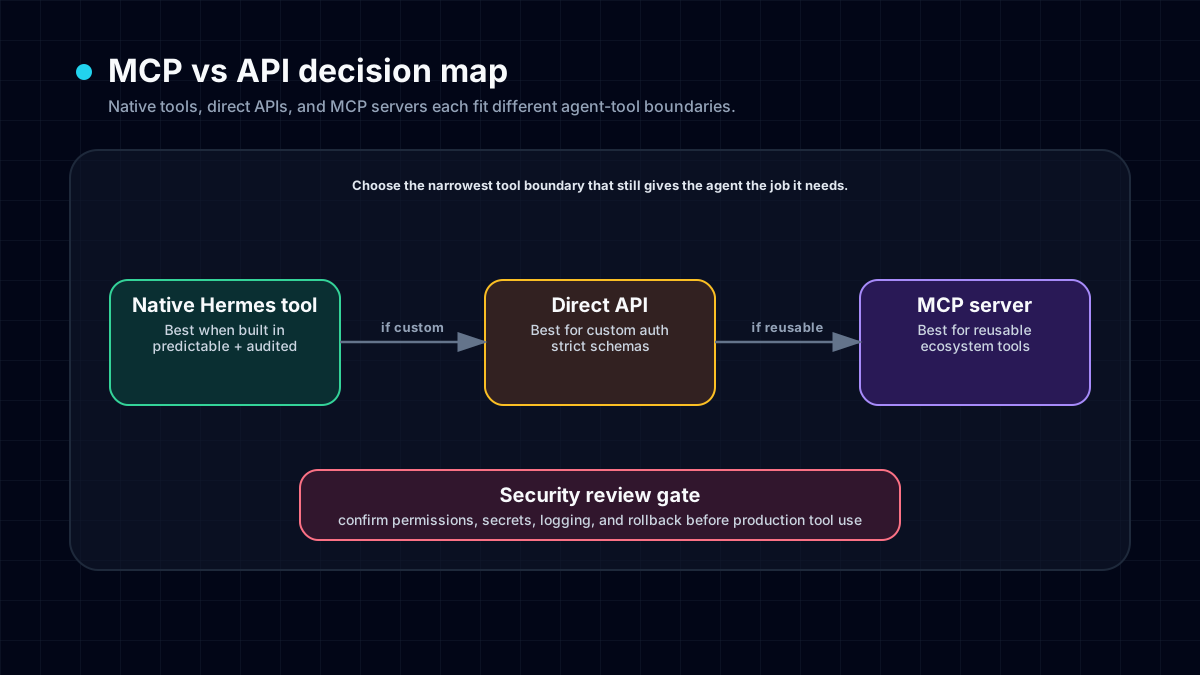
MCP vs API vs Native Hermes Tools#
MCP is best understood as a standard adapter layer. Instead of every agent inventing its own connector for every app, an MCP server exposes tools and resources in a common shape.
Use native Hermes tools when they exist. Hermes already has built-in surfaces for browser automation, terminal work, files, scheduled jobs, and messaging gateways like Telegram. Native tools usually have better guardrails and clearer verification.
Use MCP when the server is maintained, scoped, and solves a real integration problem. Examples include a database inspector, a docs search tool, a design-system resource server, or a company-internal API wrapper.
Use a direct API when you need exact request/response control, custom retry behavior, strict logging, or a small integration that would be overkill to wrap as an MCP server.
A Safe MCP Setup Pattern#
Start narrow:
- Add one server, not a whole toolbox.
- Confirm what tools it exposes.
- Ask Hermes to run a harmless read-only query.
- Inspect logs and output.
- Only then enable write actions or broader credentials.
A practical first prompt:
Use the configured MCP server only for read-only inspection. List available resources and summarize what each tool can access. Do not create, update, delete, send, or publish anything.
That prompt turns the first run into an audit instead of an accidental production action.
Example Configuration Workflow#
From the Hermes CLI, the usual flow is:
hermes mcp add docs-search
hermes mcp list
hermes mcp test docs-search
hermes mcp configure docs-search
Then restart or reload the active session if needed. In a messaging gateway, remember that live sessions can keep an old tool cache; /reload-mcp or a gateway restart may be required before the new MCP tools appear.
Security Checklist#
Before using MCP in a serious workflow, check:
- Does the server need write access, or is read-only enough?
- Are secrets stored in
.envor a profile-specific environment, not pasted into prompts? - Can the server reach private files, databases, browser cookies, or production systems?
- Does the server expose tools with dangerous names like delete, execute, publish, transfer, or send?
- Do you need a dedicated Hermes profile for this integration?
- Is the server maintained and auditable?
If the answer is unclear, keep the server out of your default profile. Use a project profile, a sandbox, or a separate self-hosted Hermes runtime.
Common MCP Failure Modes#
The MCP server works in the CLI but not in Telegram#
The gateway may be running with a different profile, stale process, or older tool cache. Verify the active profile, then reload MCP or restart the gateway. If the automation is recurring, pin it to a Hermes cron job with an explicit workdir and toolset.
The server exposes too many tools#
Do not enable everything by default. Configure only the tools needed for the workflow. A focused MCP server is easier to test, safer to run, and cheaper in prompt/tool overhead.
The server is just a thin API wrapper#
That can still be useful, but ask whether a direct Hermes tool or small script would be simpler. MCP is valuable when reuse and interoperability matter, not when it adds ceremony.
Best Use Cases for Hermes + MCP#
- Internal docs search
- Database or warehouse inspection
- Design-system resources
- Local developer services
- Company SaaS tools without a native Hermes connector
- Research tools that multiple agents should share
MCP is strongest when it expands Hermes' reach without blurring permissions. Treat every new server as a capability grant. If this server can read files, hold credentials, or mutate external systems, run through the MCP security risks checklist before enabling it in a gateway or cron workflow.
FAQ#
Should I use MCP for every Hermes integration? No. Use native Hermes tools first when they already solve the job. Use MCP when it gives you a maintained reusable connector.
Is MCP safe? MCP can be safe, but only when permissions are scoped. A server with broad filesystem or production write access should be treated like any other powerful automation tool.
Can MCP work from Telegram or Discord Hermes sessions? Yes, if the gateway profile has the MCP server configured and the session has reloaded the tool list. Stale gateway processes are a common reason tools appear missing.
What is the best first MCP server to add? Pick a read-only server such as docs search or local project inspection. Avoid write-heavy production tools until the setup is proven.
Claude Desktop as an MCP front-end#
Claude Desktop is a natural MCP front-end for users who want a desktop chat surface while reusing Hermes Agent workflows. The safe pattern is to prove Hermes locally, run hermes mcp serve from a narrow profile, add that command to Claude Desktop, and test a read-only workflow first.
Use the dedicated Claude Desktop MCP connector setup guide for the step-by-step flow, then review MCP security risks before exposing shell, browser, filesystem, or credentialed tools.
MCP vs CLI update (2026-07-10): if the alternative is a simple local shell command, do not add MCP just for fashion. Use the MCP vs CLI guide to decide when a reusable tool server is worth the extra trust boundary.
v0.21 adds an MCP command center#
Pantheon combines configured servers and the catalog in Desktop, with paste/import flows, background health checks, schema-token estimates, 30-day usage, and confirmation-gated deep links. Read the v0.21 release guide, then keep using this guide for transport, credentials, tool filtering, reloads, and proof of execution.
Before choosing connector infrastructure, distinguish it from a hosted agent subscription: the Zapier Agents review explains its separate activity meter, public-browser boundary, and app-connected workflow fit.
A connector is not an entire automation platform. The n8n AI Agent Builder review explains when an inspectable workflow backbone and its agent layer are the more appropriate architecture, including separate runtime and builder costs.
Hosting a remote MCP service introduces a separate lifecycle decision. Our Cloudflare Agents review examines a developer reconnect-billing report and explains why a stateless tool gateway should not automatically create a new durable session for every connection.