Tool
Hermes Agent Obsidian Integration for Notes, Memory, and Markdown Workflows
Plugin-style Hermes Agent + Obsidian workflows for scoped Markdown notes, memory review, daily summaries, and local-first project context.
Quick answer
Use the Obsidian workflow as a scoped, human-reviewable Markdown layer around projects and memory. Keep Hermes built-in MEMORY.md and USER.md as the durable agent context, use SQLite session history for transcripts, keep secrets outside the vault, and only promote stable facts from notes into memory.
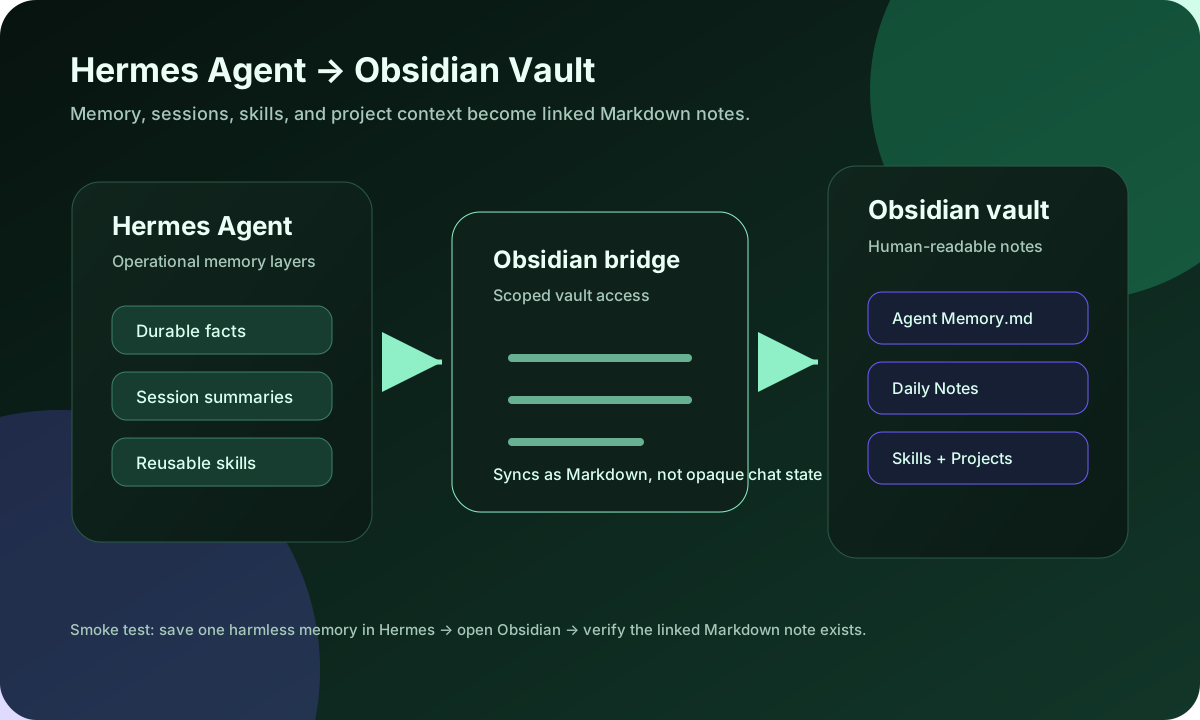
Community demand around memory/context/session issues makes the Obsidian page a practical local-notes workflow, not a generic plugin listing. The safe pattern is to scope one folder, write one harmless memory or session summary, verify the Markdown in Obsidian, then expand to project notes and skills after the first sync is clean.
Hermes Agent Masterclass Module 3: Memory & Obsidian Integration — Tonbi
Module 3 of Tonbi's Hermes Agent masterclass is the most comprehensive explanation of the memory system, concluding with a live Obsidian vault demo. Tonbi covers the four memory layers in depth: Layer 1 (built-in memory.md and user.md markdown files, ~1,300 token budget), Layer 2 (FTS-5 full-text session search over every prior conversation stored in state.db), Layer 3 (pluggable memory providers: Honcho, Memo, Hindsight, Supermemory), and Layer 4 (Obsidian skill for structured long-term knowledge bases). The Obsidian section shows Hermes populating a real vault with HVAC provider research in real time.
- 0:00Introduction – four memory layers overview
- 2:30Layer 1: memory.md and user.md built-in files
- 7:00The frozen snapshot pattern and why memory writes are delayed
- 10:00Memory tool: add / replace / remove actions and injection scanning
- 16:00Layer 2: FTS-5 session search in state.db (live demo)
- 22:00Layer 3: pluggable memory providers – Honcho, Memo, Hindsight, Supermemory
- 26:00Installing and configuring Honcho (live demo)
- 32:00Layer 4: Obsidian skill – live vault population with HVAC research
Setup steps
- 1Install or update Hermes Agent, run hermes doctor, and confirm a basic hermes chat -q smoke test works before adding vault sync.
- 2Create a dedicated Obsidian folder such as /Hermes or /Agent Memory instead of granting Hermes your whole personal vault on day one.
- 3Decide what Hermes may write first: durable project facts, session summaries, skills, project indexes, or daily notes. Keep credentials, client secrets, and private journals outside the scoped folder.
- 4Configure the Obsidian integration/plugin path from the active Hermes profile so the gateway/CLI process sees the same vault path you tested in the terminal.
- 5Run one harmless sync smoke test: ask Hermes to save a durable memory like “project X uses npm run build,” then verify a Markdown note appears in Obsidian with a timestamp and useful links.
- 6Review the first generated notes before expanding access. If notes are noisy, split durable memory from session logs and tighten folder scope.
What you can verify
Features
- ✓Hermes Agent memory surfaced as Obsidian Markdown
- ✓Linked notes for projects, people, tasks, and skills
- ✓Session-history summaries that stay searchable in your vault
- ✓Daily-note and project-note workflows for agent-assisted journaling
- ✓Local-first memory review and backup
- ✓Editable knowledge base for correcting what the agent remembers
- ✓Obsidian integration search intent covered explicitly
- ✓Scoped vault folder setup before broad note access
- ✓Reviewable Markdown for memory, session summaries, project facts, and skills
- ✓Clear boundary between Obsidian notes and Hermes runtime memory
Best use cases
How this fits with Hermes Agent
Project memory review
Before Hermes starts a new coding or research task, open the project’s Obsidian note to inspect repo paths, conventions, prior blockers, preferred commands, and links to the underlying Hermes skills.
Daily agent journal
Let Hermes summarize meaningful sessions into a daily note, then link outcomes to the relevant project or skill. This keeps durable context separate from ephemeral logs.
Skill library maintenance
Use Obsidian to browse and annotate Hermes skills, then patch the actual SKILL.md files when a workflow changes. The vault is the review surface; Hermes remains the execution engine.
Memory troubleshooting loop
When memory feels stale, compare the Obsidian note, active Hermes profile, session state, and memory configuration. Many failures are profile/path/context problems rather than an Obsidian problem.
Related Hermes Agent guides
FAQ
It connects selected Hermes Agent memory with an Obsidian vault so memories, session summaries, skills, and project context can be reviewed as linked Markdown notes instead of hidden chat state.
The search intent is plugin-style Obsidian sync. In practice, configure Hermes to read and write scoped vault folders, then use Obsidian as the visual editor and knowledge graph for selected agent notes.
Start with a small /Hermes or /Agent Memory folder for durable project facts and one session summary. Expand to daily notes, skills, or project folders only after the first sync is verified.
It can only use paths you expose, and you should not start with the whole vault. A scoped folder is safer than broad vault access, especially if your notes contain private data, credentials, client details, or journals.
Ask Hermes to save one harmless memory or session summary, then open Obsidian and verify that a Markdown note was created with useful links, timestamps, and no secrets.
Check the active Hermes profile, memory settings, session state, and auxiliary model health. Obsidian can make memory visible, but it does not fix a disabled memory provider, wrong profile, or failed context compression by itself.
Yes. Use Obsidian as the local Markdown review layer for selected Hermes memory, session summaries, project notes, and skills. Keep the exposed vault folder scoped at first.
No. Obsidian is where humans review and edit Markdown notes. Hermes memory and session search are the runtime context systems the agent uses during future work.
No. Treat Obsidian as the readable note and review layer. Keep durable facts in Hermes memory and reusable procedures in Hermes skills.
Ask Hermes to create one note inside a scoped vault folder, read it back, and list exactly which files it touched.
No. The Obsidian skill is file-system based and works headlessly. It reads and writes Markdown files in the vault directory via the `OBSIDIAN_VAULT_PATH` environment variable. You install the Obsidian app locally on your own computer to view and edit those notes visually — the app does not need to run on the Hermes server.
memory.md and user.md are the built-in short-term persistent context (~1,300 token budget, ~2,200 character cap) that loads into every session. The Obsidian vault is for long-form, project-scoped knowledge — research notes, provider lists, skills documentation — that is too detailed for the memory cap but needs to persist across sessions. They work together: memory holds key facts, Obsidian holds the detailed reference material.
Yes, and this is one of the strongest use cases. Since Obsidian vaults are plain Markdown files, any AI agent that can read files can access the same context. Setting a single vault as the knowledge base for Hermes, Claude, and Open Claw means all agents share consistent facts about you, your projects, and your goals — no re-explaining yourself across tools.
Either say 'use Obsidian skill' directly in your message prompt, or use the `/obsidian` slash command followed by the operation (read, search, or create note). The agent will then use the vault path configured in `OBSIDIAN_VAULT_PATH` to perform the operation.
There was a config option called `obsidian_vault` in older Hermes versions, but it is no longer in use as of the current version. Set the vault path using the environment variable `OBSIDIAN_VAULT_PATH` instead.
For large, multi-session projects, ask Hermes to store research findings and structured notes in the Obsidian vault rather than (or in addition to) memory.md. The Obsidian skill creates separate Markdown files for each entity or topic, complete with wiki links connecting related notes. On future sessions, Hermes can search the vault to recall prior research — analogous to reading back from a wiki rather than relying on the limited memory.md context window.
Hermes has a built-in self-improvement loop: every 10 conversation turns, it spawns a sub-agent that reviews the transcript and updates memory.md, user.md, and skill files automatically — without you asking. After about 15 turns, a skill review runs. Stale sessions from a couple of days ago are reviewed at 4:00 a.m. to capture learnings before context expires. Obsidian users can symlink their memory and skill files into the vault to see and review what this loop is writing.
No. Having many skills active simultaneously loads all their descriptions into the model context, which can confuse the model about which skill to use. One real example: a user asked for a presentation outline and the agent activated the PowerPoint skill instead of the Obsidian note skill. The recommendation is to keep only the skills you actively use, disable the rest, and define clear, non-overlapping descriptions for the ones you keep.
Yes — this is one of the most novel capabilities reported by users. In one documented case, a user was doing a research workflow (searching YouTube for sources, importing to Notebook LM), and Hermes automatically captured the pattern and created a new skill file for it at the end of the session, without being asked. This is part of the self-improvement loop described above.