This page owns one search intent: Hermes Agent Discord setup. The goal is to get one Discord bot working in one safe channel, verify the Hermes gateway path, and only then expand to threads, community support, cron alerts, or team workflows.
Quick answer#
To connect Hermes Agent to Discord, create a Discord application, add a bot, enable Server Members Intent and Message Content Intent, invite it with bot and applications.commands, run hermes gateway setup, allow at least one user, role, or channel, restart the gateway, and send one real test message. Current Hermes fails closed: a bot can appear online yet deny every inbound user when no Discord access policy is configured. Use the Discord integration checklist for the product overview, the gateway troubleshooting guide when a connected bot stays silent, or FlyHermes when you want managed channel uptime instead of operating the gateway.
The 2026 setup change most guides miss#
Hermes Discord access is now fail-closed. DISCORD_BOT_TOKEN alone is not enough. Configure at least one of these policies before testing:
# Recommended for a personal bot
DISCORD_ALLOWED_USERS=284102345871466496

# Better for a changing moderator/support team
DISCORD_ALLOWED_ROLES=987654321098765432

# Narrow a guild bot to selected channels
DISCORD_ALLOWED_CHANNELS=123456789012345678
Use DISCORD_ALLOW_ALL_USERS=true only for a trusted private server or temporary development test. If the bot is online but the logs say No Discord access policy configured, add a policy and run hermes gateway restart; resetting the bot token will not fix authorization. Keep bot credentials in the active profile's .env, not in screenshots, Git, or Docker Compose. The profiles guide explains the right isolation boundary for team and personal bots.
Copy-paste setup and proof#
hermes gateway setup
hermes chat -q "reply with discord-provider-ok"
hermes gateway restart
hermes gateway status
Select Discord during setup, enter the bot token and your copied Discord user ID, then test a DM and one exact server channel. A local CLI reply proves the provider works; gateway status proves the process started; only a real Discord reply proves token, access policy, intents, channel permissions, routing, provider, and delivery together. Use the step-by-step Discord how-to for the complete Developer Portal sequence.
Choose the conversation model before inviting a team#
Discord behavior changes by surface:
- DMs: every authorized message triggers Hermes and each DM has its own session.
- Server channels:
@mentionis required by default. Put dedicated bot rooms inDISCORD_FREE_RESPONSE_CHANNELSinstead of disabling mention gating globally. - Threads: Hermes replies inside the same thread. Set
discord.thread_require_mention: truewhen multiple bots share a thread, or they may all fire on every message. - Shared channels:
group_sessions_per_user: trueis the safe default; each user gets separate history and an independent running-agent slot. Turning it off creates one shared transcript, shared token growth, and shared interrupts. - Context between mentions:
discord.history_backfill: truerecovers recent channel messages up to the configured limit when mention gating would otherwise hide them.
This is also a security decision. Authorized Discord users can reach Hermes tools and system access. Start with one user and one private channel, keep @everyone and role mentions blocked, then expand deliberately using the Hermes security checklist.
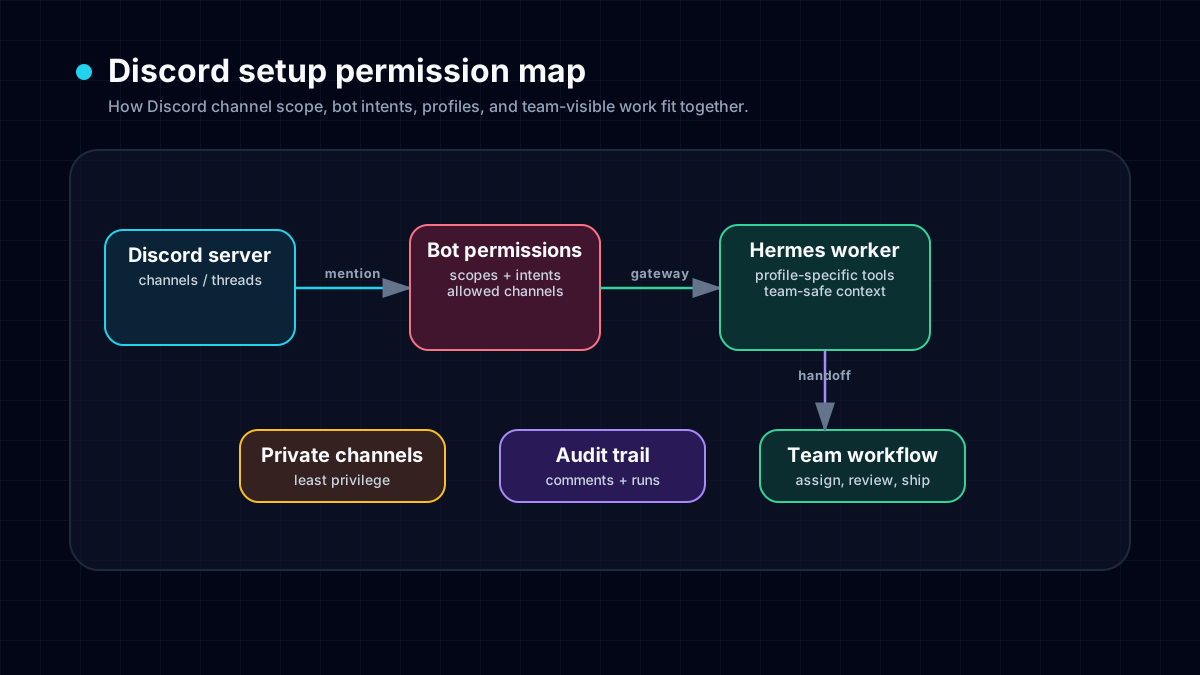
Choose the right setup depth#
Use the Discord integration overview to decide whether the workflow fits your server, and the connection checklist for the short setup sequence. Continue here when you need to understand access policies, threads, gateway health and failure diagnosis before inviting a team.
For an always-on bot, also decide who owns the host, service updates and recovery. The managed hosting option changes that infrastructure responsibility; it does not remove the need for appropriate Discord permissions or authorized model access.
Discord setup intent vs the other pages#
Keep the cluster clean:
- Use this setup article when you need the full Discord Developer Portal and Hermes gateway sequence.
- Use the Discord integration page when you are deciding whether Discord fits team support, community, or channel workflows.
- Use connect Discord to Hermes when you want the shortest implementation checklist.
- Use fix Docker Discord container issues if the Discord gateway sees the wrong filesystem, config, or environment after a container restart.
- Use Hermes Agent VPS hosting when the bot works locally but needs always-on uptime.
- Use the Hermes Agent troubleshooting guide if the model, tool, or provider layer is failing before Discord receives a message.
Step 1: choose the Discord workflow#
Before touching the Developer Portal, decide how the bot should behave. Discord has more permission surfaces than Telegram: server roles, channel overrides, app mentions, slash commands, forum threads, and message-content access.
A safe default is:
- One test server.
- One private channel.
- App mentions or slash commands first.
- Server Members Intent and Message Content Intent enabled in the Discord Developer Portal.
- A dedicated Hermes profile for the Discord bot if the server includes teammates or community members.
That profile boundary matters. A community bot should not automatically inherit every local secret, skill, browser session, or filesystem assumption from your personal CLI agent. If you need hard isolation, use Hermes Agent profiles.
Step 2: create the Discord app and bot#
In the Discord Developer Portal:
- Create a new application.
- Add a bot user.
- Copy the bot token once and store it in the active Hermes profile environment.
- Enable Server Members Intent and Message Content Intent, then save the Developer Portal changes.
- Generate an invite URL with the narrowest scopes needed for your test.
- Invite the bot to the test server and private test channel.
Do not paste the token into prompts, screenshots, Git commits, Docker Compose files, or a shared team chat. Treat it like any other gateway credential.
Step 3: configure Hermes gateway#
Use the Hermes gateway setup path rather than mixing manual edits and half-restarted processes:
hermes gateway setup
hermes gateway restart
hermes gateway status
If you maintain multiple bots or trust levels, create a dedicated profile first:
hermes profile create discord-bot
hermes -p discord-bot gateway setup
hermes -p discord-bot gateway restart
The dedicated profile keeps Discord-specific config, memory, skills, and secrets away from the rest of your local Hermes setup.
Step 4: verify the gateway before adding more channels#
Run a real end-to-end check before expanding access:
hermes gateway status
hermes status --all
Then open the Hermes WebUI dashboard and check gateway/platform health. Finally, send one Discord mention or slash command in the test channel. If it works, inspect whether the answer is scoped correctly before adding forum threads, support rooms, GitHub alerts, or cron digests.
The Discord proof matrix#
Use this matrix before you call the setup finished:
- Provider proof: run
hermes chat -q "reply with discord provider ok"from the same profile. If it fails, fix API keys, credits, fallback routing, or rate limits before changing Discord permissions. - Gateway proof: run
hermes gateway statusand check the Hermes WebUI dashboard. If it fails, restart the gateway, check the active profile, and inspect logs. - Discord channel proof: send one mention or slash command in the private test channel. If it fails, check OAuth scopes, Message Content Intent, app mention policy, channel allowlists, and role permissions.
- Discord thread/forum proof: send one reply in the exact thread or forum post. If it fails, check thread membership, inherited permissions, and whether the bot can view/send in that surface.
This is also where the self-hosted-vs-managed decision becomes obvious. If the team wants a reliable Discord agent but not the provider fallbacks, gateway logs, Docker restarts, and Web UI monitoring, route the workflow to FlyHermes pricing instead of adding more VPS glue.
For a long-running service, pair this with Hermes Docker Compose or the VPS deployment guide, but remember the maintenance cost: process managers, env files, gateway logs, Docker updates, TLS, and restarts. If that is not the work you want, FlyHermes is the managed option.
Keep a setup record you can test again#
Record the intended bot identity, Hermes profile, host, allowed users or channels, and one test channel. Keep credentials out of that record. After a change, verify startup, one inbound message, one model completion and one reply in the same destination. Repeat the thread check separately if you use private threads or forum posts.
This record is more useful than a screenshot showing the bot online: it distinguishes an authorization change from a stopped service, a local filesystem error or a provider failure.
Troubleshooting map#
Bot is online but Hermes does not answer#
Check these in order:
- Is the message an app mention or slash command if free-response is disabled?
- Does the bot have channel access and permission to send messages?
- Is Message Content Intent enabled if you expect normal message reading?
- Did you restart the gateway after changing tokens, channels, or profile config?
- Does
hermes gateway statusshow Discord connected? - Do recent Hermes logs show the inbound Discord message?
Works locally but not in Docker or on a VPS#
This is usually an environment mismatch. Confirm the service can read the same profile, token, and config that worked locally. Then inspect container/service logs. The Docker Discord troubleshooting guide is the right page if the bot starts from the wrong directory, reads the wrong .env, or loses gateway state after restart.
Threads or forum channels behave differently#
Test in layers: normal channel first, private thread second, public/forum thread third. If normal channels work but threads fail, the problem is probably thread permissions, bot membership, or gateway thread handling rather than the model provider. Use the Discord integration page for the decision framework and this setup guide for the operational checks.
The bot responds in places it should not#
Narrow the deployment. Use channel allowlists, role permissions, app mentions, and a dedicated Hermes profile. For community servers, safer defaults beat convenience: a permission mistake can expose a tool-using agent to the wrong audience.
Self-hosted Discord bot vs FlyHermes#
Self-host when you want full control over the machine, profile, tools, secrets, logs, and gateway behavior. That is the right choice for developers who already run servers and want local ownership.
Use FlyHermes when you want the Discord/mobile/channel outcome without maintaining the bot stack. The trade is simple: self-hosting gives maximum control; FlyHermes pricing buys managed uptime, browser access, mobile access, and fewer gateway chores.
Final setup checklist#
- One test server and one private test channel are selected.
- Discord app and bot are created.
- Server Members Intent and Message Content Intent are enabled.
-
DISCORD_ALLOWED_USERS,DISCORD_ALLOWED_ROLES, orDISCORD_ALLOWED_CHANNELSis configured. - Bot token lives in the active Hermes profile environment.
- Gateway was restarted after config changes.
-
hermes gateway statusshows Discord connected. - One mention or slash command works in the test channel.
- WebUI shows gateway/platform health.
- Docker/VPS/FlyHermes decision is explicit before inviting the bot into production channels.
Provider reliability is part of this workflow too. If setup fails because credits, API keys, rate limits, or model switching are unclear, use the Hermes Agent model provider costs guide to choose a primary model lane, a cheaper routine-work lane, and a local or hosted fallback before blaming the rest of the stack. If Discord users can reach MCP tools, isolate the bot profile and follow the MCP security risks guide before granting file, database, or deploy access.
For team bots that must stay online, the 24/7 AI agent setup guide connects Discord permissions to the rest of the production path: supervised gateway process, model fallbacks, dashboard checks, and FlyHermes when managed uptime matters more than self-hosting.
Separate Discord permissions from Windows lock permissions#
Discord channel permissions decide whether the bot can read and send in a channel. Windows filesystem permissions decide whether the local Hermes process can create its bot-token lock. Granting Discord Administrator cannot repair a local PermissionError whose path contains gateway-locks.
Before changing the Developer Portal, read the first startup failure and classify it:
- A local access-denied path: inspect that path and the Windows account running Hermes.
- A conflict naming another profile: identify the bot's intended gateway owner; do not delete the lock.
- A connected adapter with an inference error: inspect the model route or local-model server, not Discord permissions.
The gateway troubleshooting guide includes read-only PowerShell checks and a narrowly scoped recovery sequence. Finish setup under the ordinary runtime account, then test one message in the exact channel and one in any thread you intend to use. Treat those as separate results; a green connection badge does not prove either message completed.
Current official profile documentation describes token ownership protection. It is a safeguard to preserve, not a file to remove whenever startup fails.
If Discord stops replying after setup#
If Hermes works in the terminal but not in Discord, use the gateway troubleshooting guide before rotating the bot token. Check developer-portal intents, channel/thread permissions, allowlisted guilds/channels, the active Hermes profile, and current agent.log entries. Then send one real message in the exact Discord channel or thread you expect Hermes to answer.
REST health is not Gateway WebSocket health#
Discord uses separate REST and Gateway WebSocket transports. A successful fetch_user() or bot-online check proves the token can reach REST; it does not prove that the event socket is open, receiving heartbeat acknowledgements, or delivering new messages to Hermes. For an always-on bot, inspect ready/socket state, heartbeat ACK age, and finite latency in the gateway logs. Hermes's built-in liveness monitor emits one retryable fatal event after repeated unhealthy samples so the gateway reconnect watcher can create a fresh adapter. Do not add a second unbounded reconnect loop. Keep DISCORD_COMMAND_SYNC_POLICY=safe for normal slash-command startup so Hermes only updates commands whose metadata changed; use bulk or off only deliberately. Pair this transport check with the gateway troubleshooting runbook, then prove recovery with one message in the exact production channel or thread.
Duplicate Discord replies usually mean duplicate gateways#
If one Discord message gets two different Hermes answers, inspect hermes gateway status --deep --full, the process list, and launchd/systemd before changing the bot token. A stale legacy gateway can survive a normal update and handle the same Discord event beside the current service. The gateway troubleshooting runbook includes the safe process-identification and restart sequence.
Diagnose duplicate replies before changing the prompt#
First check whether the extra Discord message is labeled as a recovered reply: current gateway delivery is at-least-once, so an ambiguous send can be redelivered without rerunning the agent. If there is no recovery explanation, trace ownership and execution rather than changing the writing prompt. Two local shells, services, containers, profiles, or old VPS deployments may be running the same bot token. Capture one test message timestamp, identify every gateway process that can see that token, stop the duplicate, and repeat the test. The acceptance criterion is simple: one inbound event, one agent turn, one outbound send, and one visible reply.
If the bot is silent instead, follow the opposite branch. No inbound event means checking the Discord Gateway WebSocket, privileged intents, channel visibility, thread membership, and mention policy. An inbound event with no turn means checking Hermes allowlists and the active profile. A started turn that fails belongs in the provider cost and rate-limit runbook. A completed turn with no visible message belongs in Discord delivery permissions. The gateway troubleshooting guide covers the full log timeline, while the Discord integration page keeps the product and setup boundary clear.