A VPS keeps Hermes reachable when your laptop is asleep, but only if the runtime, gateway and scheduled workers are supervised and their state persists. Start with one working task, then test the same result after a controlled service restart.
Quick answer#
If the VPS plan is mostly about keeping Hermes online for phone, dashboard, Telegram, Discord, and cron access, compare the self-hosted vs hosted AI agent guide before buying infrastructure. A VPS gives control, but it also makes you responsible for OS updates, firewall rules, service restarts, provider credentials, backups, and dashboard exposure. The FlyHermes pricing path is the commercial shortcut for teams that want the same always-on outcome without becoming their own agent SRE.
If you do not want to maintain Linux, Docker, gateway restarts, provider keys, backups, and updates, skip the VPS path and use FlyHermes. If you do want full control, a VPS is the right always-on runtime for Hermes Agent.
For host Hermes Agent on a VPS, start with a working Hermes install, configure the one provider or integration the workflow needs, run a tiny end-to-end smoke test, and only then expand to groups, servers, scheduled jobs, or production data. Hermes is strongest when the workflow can use memory, tools, skills, and verification rather than producing a one-off chat answer.
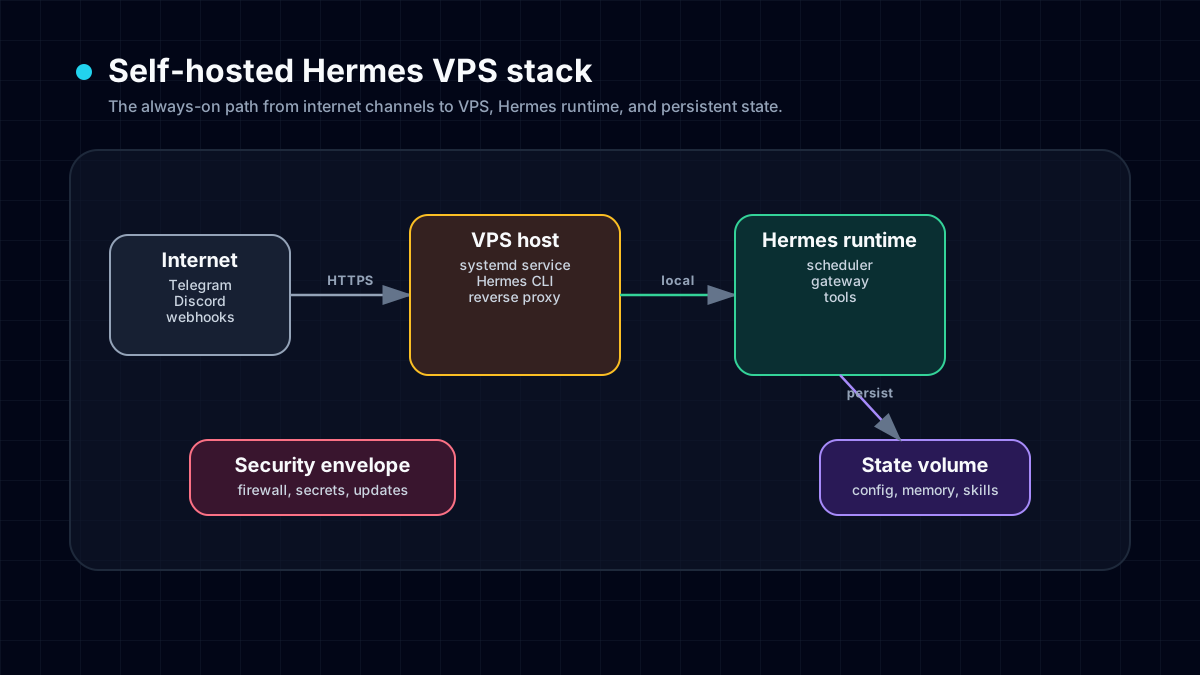
Self-hosting is the right route when control matters more than maintenance time. For the broader decision, compare the best self-hosted AI agent path with hosted FlyHermes, and check Hermes Agent vs ChatGPT if your real question is whether you need an always-on agent rather than a chatbot.
Size optional screens separately from ordinary chat#
Do not use a Bot Screen error as a minimum-RAM benchmark for every Hermes VPS. The official Bot Screen guide describes an additional Linux desktop and headed browser, with admission based on available memory on the host or its tighter container limit. A quiet, recently provisioned instance can still fail that check.
First run ordinary chat without opening the screen. Then record which process or container owns the optional desktop, available memory before launch, the effective memory limit and the exact refusal. hermes computer-use screen status is the documented starting point for identifying screen readiness on the owning host. Inspect its output privately rather than posting diagnostic bundles publicly.
For a deployment that needs screen takeover, test the actual website and number of concurrent screens you intend to use. Browser pages vary in memory consumption; a nominal plan size is not a measured safety margin. Keep enough storage for persistent state and logs as well as RAM for the live workload. Do not disable a memory admission check just to make the demonstration start.
For a text/report workflow, avoid installing a remote desktop simply because a tutorial shows one. The self-hosted versus FlyHermes guide separates the required job from optional UI surfaces before you commit to infrastructure.
Check the service environment before blaming the VPS#
If a scheduled task works over SSH but fails under the gateway service, compare the service user, active Hermes profile, HERMES_HOME, workdir, and executable PATH. An interactive shell can hide missing runtime dependencies through login scripts and credentials that the service never loads.
Before production use, run read-only cron diagnostics under the intended profile and verify a harmless output after a planned service restart. On systemd hosts, inspect whether restart-safe worker scopes are available; a separate process alone may not survive a gateway restart. The cron recovery runbook covers degraded dispatch and unknown attempts. Keep these checks in the VPS runbook instead of assuming a larger instance fixes configuration or delivery problems.
Source: official Hermes scheduled-task documentation.
What this guide is for#
People searching for host Hermes Agent on a VPS usually have an operational question, not a curiosity question. They want to know what to set up first, what can safely be skipped, where credentials belong, and how to prove the setup works. Hermes Agent can be used from the CLI, gateways, desktop surfaces, Docker, VPS hosts, and background jobs, but each path still depends on the same basics: a valid model provider, readable config, enabled tools, and a runtime that can execute the task.
Use this article as a practical checklist. If you are evaluating Hermes for the first time, begin with install Hermes Agent. If you already run Hermes locally and want the agent to stay online, compare the workflow with self-host Hermes. If you need a managed or commercial route, check Hermes pricing before overbuilding your own deployment.
Practical setup checklist#
- Confirm the base agent works — run one local Hermes prompt before adding any integration, backend, or UI layer.
- Choose the narrow workflow — define the smallest outcome that proves deploy Hermes Agent on a VPS; do not begin with a giant automation.
- Add credentials safely — place API keys, bot tokens, and webhook secrets in config or environment files, never in prompts or committed content.
- Enable only the needed tools — give Hermes the specific browser, terminal, messaging, file, or web tools required for this workflow.
- Run a visible smoke test — send one message, create one file, complete one background job, or receive one webhook event.
- Save the procedure — after the first success, turn the verified steps and pitfalls into a Hermes skill so the workflow improves next time.
This order matters. If the model key is wrong, every gateway looks broken. If the workspace mount is wrong, every Docker run looks like a reasoning failure. If a bot token is copied into the wrong profile, the agent can be healthy while the integration stays silent.
Hermes-specific proof points#
- Persistent memory: persistent memory lets Hermes remember stable preferences, project facts, and corrections across sessions.
- Reusable skills: the Hermes skills guide explains how successful procedures become reusable operating knowledge.
- Tool execution: Hermes can use terminal, browser, web, file, GitHub, messaging, and MCP-style tools when the profile enables them.
- Gateway architecture: platform-specific entry points can route into the same underlying agent instead of creating separate bot brains.
- Self-hosting path: long-running workflows can move from a laptop to a server when reliability matters.
These are the reasons Hermes is different from a normal chatbot. A hosted chat tab can answer a question, but Hermes can remember how your environment works, call tools, and repeat a verified process.
Common failure modes and fixes#
- The agent does not start: check Python, Node, PATH, virtualenv, and the Hermes config path before debugging the workflow itself.
- The model answers but tools fail: the provider may work while tool calling, toolsets, or local permissions are disabled.
- The integration is silent: bot tokens, OAuth scopes, channel permissions, webhook URLs, or gateway processes are usually the cause.
- The task works once but not later: store durable facts in memory and procedural steps in skills instead of relying on the current chat.
- A background workflow reports success too early: verify the real artifact, rendered page, sent message, or external event, not only the process exit code.
When troubleshooting, change one layer at a time. Start with the CLI, then the model, then tools, then the backend, then the integration. This makes the root cause visible instead of turning the whole setup into a guessing game.
Recommended internal links#
- install Hermes Agent — base install path.
- self-host Hermes — always-on deployment route.
- Hermes pricing — commercial path.
- persistent memory — context that survives sessions.
- Hermes skills guide — procedures and pitfalls as reusable skills.
- deploy Hermes on a VPS — deployment guide.
- cron scheduling — scheduled work.
- terminal backends explained — backend guide.
These links give the reader a next step in every direction: installation, commercial evaluation, feature proof, integration setup, and deeper workflow guidance.
When to use this workflow#
Use this workflow when the result needs continuity. Good examples include team message gateways, scheduled monitoring, coding tasks with repeatable review steps, local file operations, server-side automations, and research processes that should remember prior decisions. Hermes is usually overkill for a single casual answer, but it is a strong fit when the agent should become part of how work gets done.
If the task touches sensitive files, paid APIs, production servers, or public messaging channels, add a human approval point. Hermes can act quickly, which is useful, but operational speed should be paired with clear scope and reversible steps.
Bottom line#
Host Hermes Agent on a VPS: Always-On Setup Guide is not about chasing a feature label. It is about making Hermes Agent solve keeping gateways, cron jobs, and webhooks available when your laptop is asleep in a way that can be tested, repeated, and improved. Start small, verify the smoke test, document the working path, and expand only after the agent proves it can do the narrow job reliably.
Recent community signal: VPS hosting is powerful, but it is the maintenance path#
The recent Nous Discord scrape shows why this page should be framed honestly. The May 2026 support threads include "How to auto update without auto kill? (Running in container)", "copy entire hermes from one linux to other linux", "restart loop", "Cant figure out how to get Hermes to work", and Docker-specific tool failures. Those are not edge cases; they are what happens when an always-on agent becomes real infrastructure.
A VPS is the right path if you want root access, custom gateway processes, private networking, self-managed Docker, and direct control over logs and credentials. It is the wrong first path if you mainly want an agent that answers from Telegram or Discord, runs recurring jobs, and survives updates without you becoming the operator.
Use this decision rule:
- Choose a VPS when you are comfortable owning Linux updates, process supervision, firewalls, provider keys, backups, and recovery drills.
- Choose Docker when you need stronger isolation but still want to operate your own runtime.
- Choose FlyHermes when the business goal is the agent outcome, not maintaining the box that runs the agent.
That is the commercial point: self-hosted Hermes is powerful, but hosted Hermes is the shorter path for teams that want workflows live this week.
The self-hosting checklist that prevents most support threads#
Before you put paid work, customer messages, or daily automations on a VPS, verify these ten items:
hermes doctorpasses in the exact user account that will run the gateway.- The default provider and model are configured, and a one-line
hermes chat -qsmoke test works. hermes gateway statusand the platform-specific bot test both work before you add cron jobs.- Secrets live in
.env, not in shell history, code, screenshots, or copied prompts. - You know whether the terminal backend is local, Docker, SSH, or another backend; see terminal backends explained.
- Restart behavior is documented: systemd, launchd, Docker restart policy, or your process manager of choice. On native Linux, keep
hermes dashboard(browser UI) orhermes serve(headless Desktop backend) under a user service, choose one per port, and keep the messaging gateway as a separate service. The dashboard persistence runbook includes a copy-paste unit, Docker permission checks, lingering, and journal verification. - Backups cover config, skills, memory, cron jobs, and any project-specific state.
- Updates are tested in a low-risk session before the production gateway is restarted.
- Logs are easy to inspect when Telegram, Discord, memory, tools, or provider calls fail.
- There is a rollback path when an update, plugin, MCP server, or local memory layer breaks the install.
If that list sounds like work you do not want, do not force the VPS path. Use the hosted path and spend your time designing workflows instead of debugging a server.
FlyHermes vs VPS: the honest split#
A VPS gives you maximum control. FlyHermes gives you speed and less operational drag. For developers and technical teams, the decision is not ideological; it is about where your time should go.
- VPS: best for private infrastructure, custom networking, unusual toolchains, and teams that already operate servers.
- FlyHermes: best for getting an always-on Hermes-style agent into real messaging, scheduling, and workflow use without Docker, gateway, and update maintenance.
- Local laptop: best for first experiments, coding tasks, and workflows that do not need to be online while the laptop sleeps.
If you start local and later need always-on behavior, read the Hermes setup guide, harden the install with the security guide, and compare the operational cost against FlyHermes before you commit to maintaining a VPS.
Maintenance reality: VPS updates are part of the job#
The recent Hermes update command hangs (round 2) and restart loop threads are the honest cost of self-hosting: you get full control, but you also own git, Python, system services, Docker, logs, and gateway restarts. Add the Hermes update command hangs runbook to your VPS checklist. If you want the result without maintenance, route buyers to FlyHermes as the hosted alternative.
Provider reliability is part of this workflow too. If setup fails because credits, API keys, rate limits, or model switching are unclear, use the Hermes Agent model provider costs guide to choose a primary model lane, a cheaper routine-work lane, and a local or hosted fallback before blaming the rest of the stack.
For readers who are specifically trying to keep Hermes reachable all day, the 24/7 AI agent setup guide ties this VPS path to provider fallbacks, Telegram/Discord gateways, dashboard checks, cron delivery, and the FlyHermes hosted alternative.
Separate dashboard, API, and channel access on a VPS#
A remote Hermes setup has three paths that should not be collapsed into one open firewall rule. The self-hosted Dashboard and Desktop Remote Gateway use the authenticated dashboard backend on port 9119. OpenAI-compatible clients use the optional API server on port 8642. Telegram, Discord, Slack, and other channels run through profile-specific gateway services and must be verified in the exact chat or thread. Keep the dashboard on loopback through SSH or Tailscale when possible, enable only the API port a real client needs, and prove channel delivery separately. If that ownership matrix is the part you do not want, compare the self-hosted vs hosted decision guide and FlyHermes pricing.
Run a gateway incident drill before calling the VPS production-ready#
Before relying on a VPS, reboot it once, verify hermes gateway status --deep --full, inspect fresh service logs, and send a real message through the production Telegram topic or Discord thread. A supervisor can be running while a child process crash-loops or the wrong profile owns the bot. Keep the gateway troubleshooting runbook with the VPS handoff so recovery does not begin with deleting state or rotating valid credentials.
Prove the VPS works without your laptop#
A VPS is only useful as an always-on Hermes runtime if the job completes while your laptop and Desktop client are closed. Schedule one harmless task, reboot the server, verify the service returns, and confirm the real Telegram or Discord destination receives the result. The self-hosted vs hosted decision guide includes the full closed-laptop ownership test.
Add dashboard host-pressure and remote-Chat checks to the VPS runbook#
The current Hermes Dashboard and Web UI can surface low-memory, low-disk, and suspected OOM-restart warnings. Treat those banners as VPS evidence: free resources and inspect the matching gateway logs before blaming a provider. For remote Desktop, do not stop at public /api/status; sign in and verify /api/ws. A 4401 close means the ticket did not authenticate, while 4403 usually points to Host or peer rejection. If nobody wants to own these host, auth, and recovery checks, compare FlyHermes managed hosting.
Price the operator role before choosing a VPS#
A server can keep Hermes online, but the operator still owns service supervision, updates, firewall rules, dashboard access, provider credits, gateway delivery, backups, and incident response. Use the self-hosted versus hosted responsibility matrix before comparing VPS prices; it gives each failure layer an owner and an acceptance test.
Choose the VPS packaging model deliberately#
A VPS does not force Docker. You can run Hermes natively, containerize the whole application, or keep Hermes native while sandboxing execution. Use the Hermes Docker vs native comparison to choose by persistence, gateway, browser, security, and recovery responsibilities.