Hermes Agent System Prompt answers one search intent: what should go into the system prompt, and what should live somewhere else? The short version is that the system prompt should define stable behavior. Run /context all to see the system-prompt share beside skills, memory, tool schemas, conversation, and free space before adding more permanent instructions. It should not become a dumping ground for secrets, project runbooks, temporary context, or every preference you might ever have.
Quick answer#
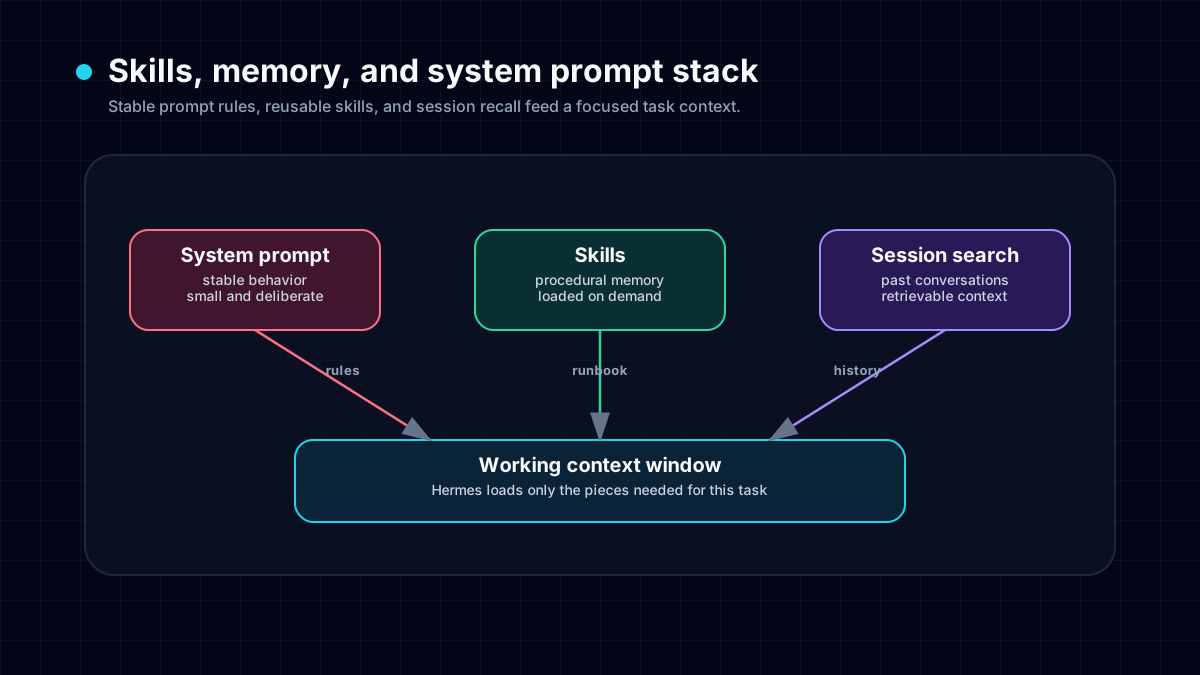
Use the Hermes Agent system prompt for durable operating rules: tone, safety boundaries, tool-use discipline, verification standards, and what kind of assistant the user wants. Put reusable procedures in skills, stable personal or environment facts in persistent memory or the persistent memory feature, past-session recall in session search, and scheduled or recurring work in cron jobs. A smaller system prompt usually performs better than a giant one because Hermes can load the right context at the right time.
What belongs in the Hermes system prompt#
Good system-prompt material is stable, general, and behavior-shaping:
- communication style the user consistently wants;
- tool-use rules, such as verifying file contents or running tests before shipping;
- safety boundaries, credential handling, and “never print secrets” policies;
- routing rules for when to use memory, skills, browser, terminal, or messaging tools;
- project-wide conventions that should apply across many future runs.
A good system prompt makes the agent more reliable without forcing every task to carry a giant context window.
What does not belong there#
Do not hide these in the system prompt:
- API keys or secrets — keep them in environment variables or Hermes config.
- Temporary task context — put it in the current prompt, a project file, or a Kanban card.
- Long command recipes — turn them into a Hermes skill so they can be updated and reused.
- One-off research notes — keep them in a report, note, or session history.
- Large copied documentation — link to it or load it only when the task needs it.
This separation is why Hermes can stay practical as workflows grow. The system prompt remains the constitution; skills and memory carry the operational details.
System prompt vs memory vs skills#
- System prompt: use it for stable identity, boundaries, tool discipline, and verification policy. Do not use it for long runbooks, secrets, or temporary project notes.
- Memory: use it for durable facts and preferences that should survive sessions. Do not use it for stale task progress, PR numbers, or one-week facts.
- Skills: use them for repeatable procedures with commands, pitfalls, and verification steps. Do not use skills for personality rules or sensitive credentials.
- Session search: use it to recall what happened in past conversations. Do not rely on it for facts that must always steer behavior.
- Kanban: use it for multi-agent task ownership and durable handoffs. Do not use it for tiny tasks that fit in one run.
If a rule changes often, it probably does not belong in the system prompt. If it is a procedure with steps, put it in a skill. If it is a stable fact, put it in memory. If it is a current project assignment, put it in the task or Kanban card.
Example: a good compact system prompt#
You are a concise, proactive operator. Use tools when they improve correctness. Before editing files, inspect the current state. After changing code or content, run the smallest meaningful verification first, then broader tests if the change is risky. Never print secrets. Save durable user preferences to memory and reusable workflows as skills.
That prompt is useful because it defines behavior without smuggling in today’s project plan. A bad version would paste a 200-line deployment checklist, two API keys, and notes about a task that will be irrelevant next week.
How Hermes compares to generic agent frameworks#
Generic agent frameworks often ask you to encode behavior in application code, prompt templates, or graph nodes. Hermes gives you more layers:
- the system prompt for stable behavior;
- memory for durable facts;
- skills for reusable workflows;
- MCP and API tools for integrations;
- Telegram, Discord, and browser/terminal tools for real-world execution;
- multi-agent workflows and Kanban for specialist handoffs.
That means you do not need one enormous prompt to control everything. You can keep the permanent policy small and let Hermes retrieve the right operational context when the task requires it.
How to improve your current prompt#
- Delete stale task notes — if the fact will be wrong in a week, it does not belong there.
- Move procedures into skills — especially anything with commands, checklists, or troubleshooting steps.
- Move durable user facts into memory — short declarative facts beat long instructions.
- Name verification rules explicitly — tests, screenshots, link checks, or source citations depending on the work.
- Add credential rules — secrets live in config or environment, not prompts or screenshots.
- Keep commercial routing honest — if users want always-on agents without VPS, Docker, gateway, and update maintenance, point them to FlyHermes or pricing where natural.
A practical prompt-bloat test#
Read each paragraph and ask: “Should this still steer the agent three months from now?” If yes, it may belong in the system prompt. If no, move it to the current task, a report, memory, a skill, or a scheduled job.
For setup-level context, start with the Hermes Agent setup guide. For security boundaries, use the security hardening guide. For recurring unattended work, use Hermes Agent cron jobs instead of trying to make the system prompt remember to do something later.